Your AI Prompts.
Organized.
Save, search, and access your prompts instantly. Context-aware. Synced to Google Drive. Works on Chrome, Edge, and Comet. Free forever.
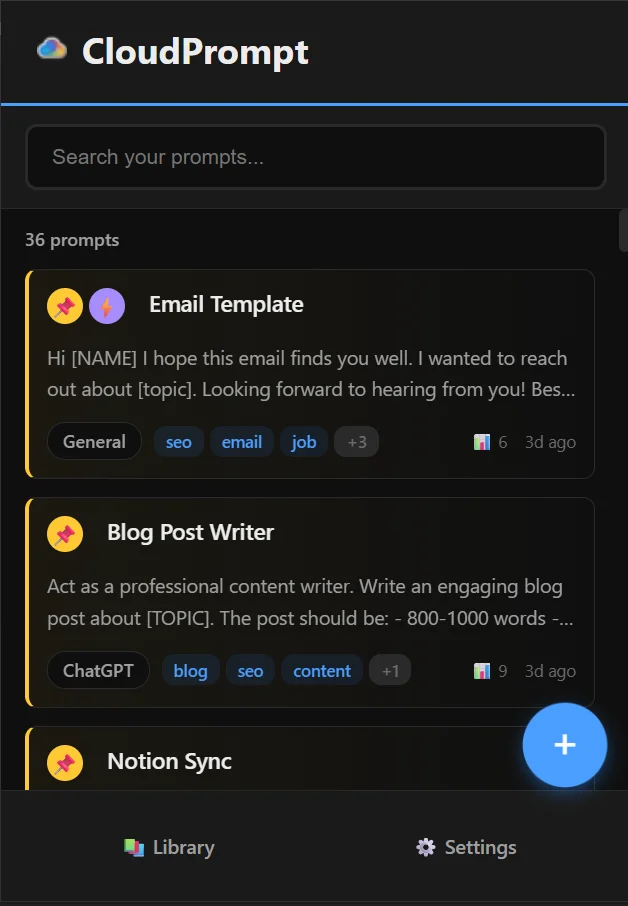
Save, search, and access your prompts instantly. Context-aware. Synced to Google Drive. Works on Chrome, Edge, and Comet. Free forever.
Simple, powerful, and private.
Press Ctrl+Shift+Y anywhere. Your prompts appear instantly.
Auto-synced to your Google Drive. Access your prompts from any device.
Your data stays in your Google Drive. We never see your prompts.
Folders, tags, and powerful search. Find what you need in seconds.
Create reusable templates with variables. Fill in the blanks and go.
Your data, your control. Export anytime as JSON or CSV.
On ChatGPT? Claude? Gemini? CloudPrompt surfaces your most relevant prompts automatically.
Works on Google Chrome, Microsoft Edge, and Comet by Perplexity. One extension, every browser.
Four simple steps to organize your prompts.
Add from Chrome Web Store
Sign in with Google
Click + to save prompts
Ctrl+Shift+Y anywhere
Works with all your favorite AI tools
Available on
Yes, 100% free with no hidden limits. We may add optional premium features in the future, but the core functionality will always be free.
Your prompts are stored in your personal Google Drive, in a folder called 'CloudPrompt'. We never see or access your data.
Yes! CloudPrompt caches your prompts locally. Access them offline and changes sync when you're back online.
Only the minimum: local storage for caching and limited Google Drive access (only files we create). We cannot access your other Drive files.
Absolutely! CloudPrompt works on any website. Press Ctrl+Shift+Y anywhere to access your prompts.
When you open CloudPrompt on ChatGPT, Claude, Gemini, or Copilot, it automatically shows your most relevant prompts for that platform first. For example, on Claude it surfaces your Claude folder first. You can turn this off in Settings → Smart Features.
Yes! CloudPrompt fully supports Microsoft Edge and Comet by Perplexity. Install it from the Chrome Web Store — both browsers support Chrome extensions. Sign-in works slightly differently: CloudPrompt opens a Google sign-in tab, you complete the sign-in, and the tab closes automatically. If you run into trouble, check that pop-ups are not blocked and try again.
Go to Settings → Backup & Restore → Export. You can download all your prompts as JSON or CSV anytime.
Join thousands of AI users who stopped losing their best prompts.
Get CloudPrompt — Free